Stellar Store explained in depth
Your own ordering website, with your brand and your customers, instead of renting them from a delivery platform that takes 30%. How it works on the inside — and what it's still missing.
The math on a delivery platform is easy: out of every €100 in orders, they keep around 30. And on top of that, the customer is theirs, not yours: you don't have their phone number or their email, and you don't know how many times they've ordered. Stellar Store exists to turn that around.
What you'll see
1. The menu with your brand
The storefront is yours: your logo, your colors and, if you want, your own domain with its certificate. The customer doesn't see “Stellar” anywhere.
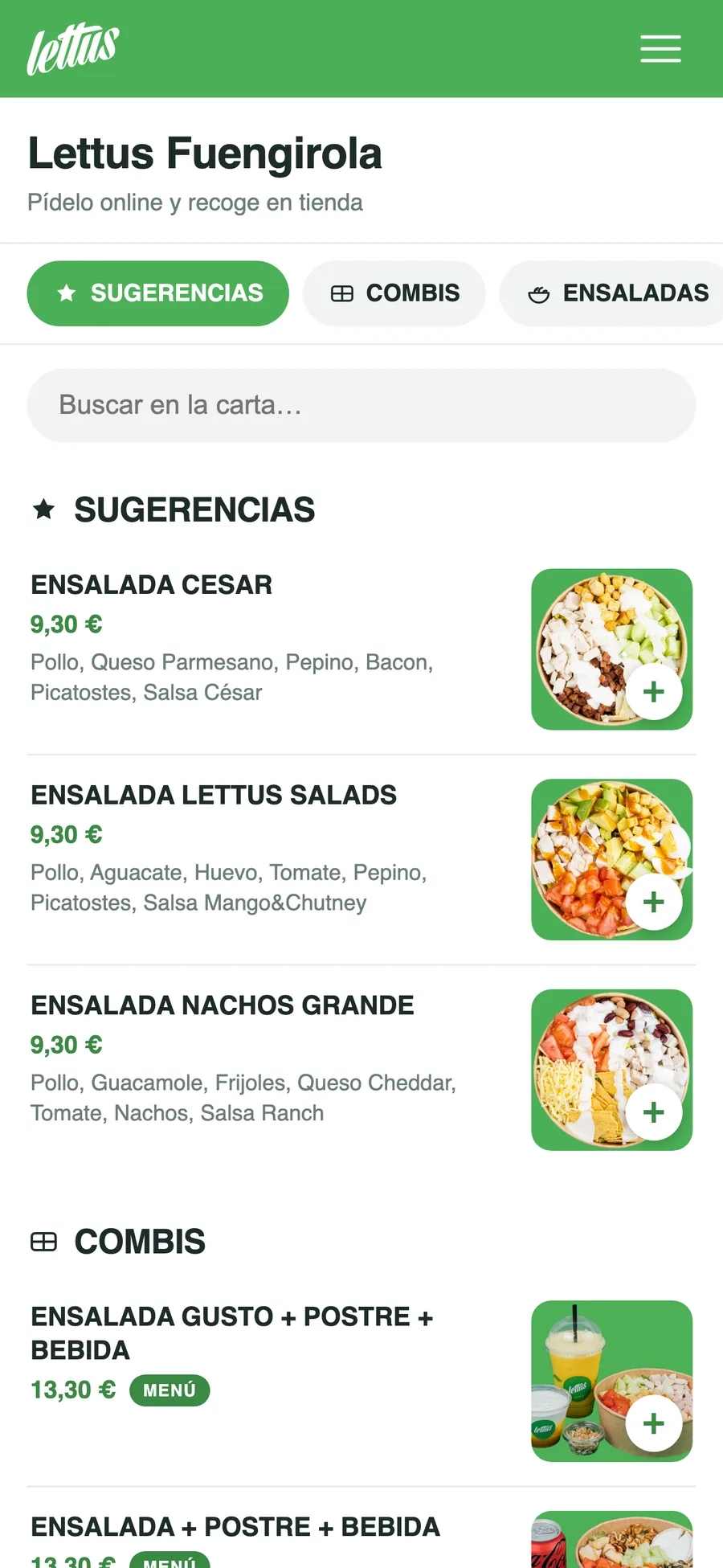
Every product has a photo, a description and allergens. Sold-out items are flagged and disappear from the suggestions. The menu can come from the POS automatically, or be its own menu, different from the one in the restaurant — which is what you usually want when delivery has different prices.
The storefront is available in Spanish, English and Swedish, and menu translations are managed from the dashboard.
2. Combos and options
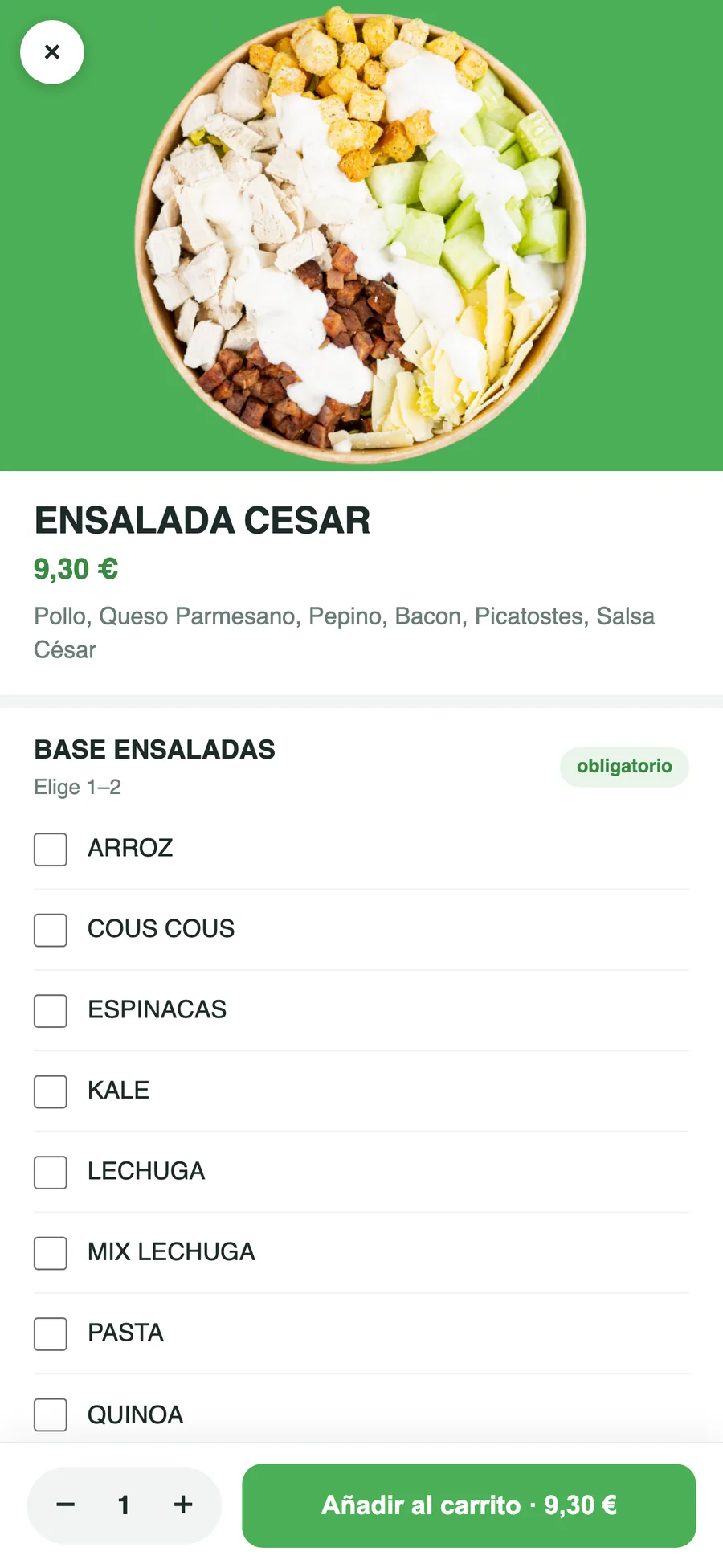
You can build step-by-step combos — pick a salad, pick a drink, pick a dessert — with required and optional groups, and extras with a surcharge. If an option is sold out, it stops being offered.
3. Pickup, delivery and scheduled orders
The customer chooses pickup or delivery, and you can enable just one of the two. Orders can be for right now, or scheduled for a day and time in 15-minute slots within your opening hours, up to two weeks ahead.
Coupons, gift cards and points all go in at that same step.
4. Ring-based delivery zones
Delivery is set up on a map as concentric rings around the restaurant. Each ring has its own minimum order, its base fee and, if you want, a price per kilometer.
The customer's address is checked on the server, not in the browser: the distance can't be faked to pay a lower delivery fee.
5. Orders go straight into the kitchen
An order from the online store appears directly on the POS kitchen display, without anyone typing it in. And the way back works too: when it's marked as ready or delivered on the POS, the customer sees it on their order tracking screen.
If it's a delivery order, the POS dispatches it to Stellar Riders. And if something fails on the way to the kitchen, the order is not lost: it's flagged with the error and can be re-sent.
6. Loyalty: points and a free order
There are two mechanisms, and they can run at the same time:
- Points per purchase, redeemable from a minimum you set yourself.
- A free order for every ten delivered, calculated on the average of that block of orders.
Points are only credited once the order is marked as delivered, not when it's placed. That's deliberate: if they were granted on ordering, you could simply order and cancel to rack up free points.
7. Your customers are yours
Every order leaves a customer record with their history, their addresses and their points. From the dashboard you can see who has stopped ordering and export that list. That's exactly what a delivery platform doesn't give you.
Customers sign in to their account without a password: they enter their email and receive a sign-in link.
8. The day-to-day dashboard
Live orders with status changes, opening hours by time slots (with a button to pull the hours from your Google listing, which suggests them for you to review), a “busy” mode for when you can't keep up, coupons, gift cards, analytics and a team with per-store permissions.
9. Price and commission, with numbers
€59/month + VAT per store, no lock-in. Plus a commission per order, which depends on how the customer pays:
| Payment method | Commission on the net amount, excluding VAT | On a €22 order |
|---|---|---|
| Cash | 2 % + 0,25 € | 0,65 € |
| Card | 0,5 % | 0,10 € |
Everything is billed together at the end of the month, in a single invoice: nothing is withheld from each payment.
To take card payments you connect your own Stripe account from the dashboard, in a couple of minutes. It's the part people like best when we explain it: the money from every order goes straight into your account, not ours, and that's why the card commission is so low. In the meantime, the store can already sell with payment on pickup or on delivery.
For comparison: on a €22 order, a delivery platform takes around €6.60.
Take a look at a real store
This is a live restaurant, with its real menu and real orders.
See a store in action →