Everything you need to run your deliveries
From the moment the order leaves the kitchen until it reaches the customer's door. No spreadsheets, no WhatsApp.
Manual or automatic assignment
The shift lead assigns each order, passes it to another rider or takes it themselves. Or they switch on automatic dispatch: to the rider closest to the store or the one with the fewest orders in hand. And if the rider declines it or doesn't accept it in time, it goes to someone else.
Your riders on a map
See each online rider's last position on the map and how recent it is. Without allowing location access, the rider can't go “Online”.
Timer and scheduled orders
Every order counts the time since it came in, in green, amber or red. Scheduled orders sit apart until their time gets close, and those for another day carry the date in red: “Not for today”.
Nobody heads out too early
The rider can't mark an order as “Picked up” until the kitchen says it's ready and, if it's paid in cash, until it shows as paid on the POS. And they can see what's in the bag to check it before leaving.
Rates by distance band
You set what the rider earns per delivery based on distance. Distance is worked out by road, from your store to the customer's address.
Rider payouts
What you owe each rider, week by week and broken down by day. Each rider sees in their app what they've earned today and this week, using the same numbers.
Works without signal
If the rider loses signal, whatever they tap to accept, pick up, deliver or cancel is saved on the phone and sent on its own once signal is back.
Timing metrics
How long each order takes from start to finish, how long it takes to assign and accept, how long the rider waits at the store and how long the trip lasts. By hour, by channel, by rider and order by order.
App for riders
Free for iPhone and Android. The rider logs in with their phone number and a PIN, gets orders with an alert even when the phone is locked, calls the customer and opens the route in Google Maps or, on iPhone, in Apple Maps. If an important fix comes out, the app asks to be updated.
How your riders and shift lead see it
The same app for both, on iPhone and Android. Each logs in with their phone number and PIN and sees their own screen.
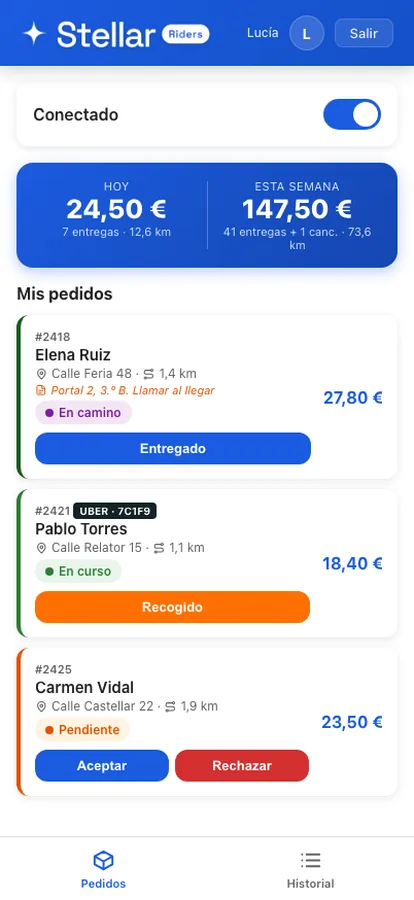
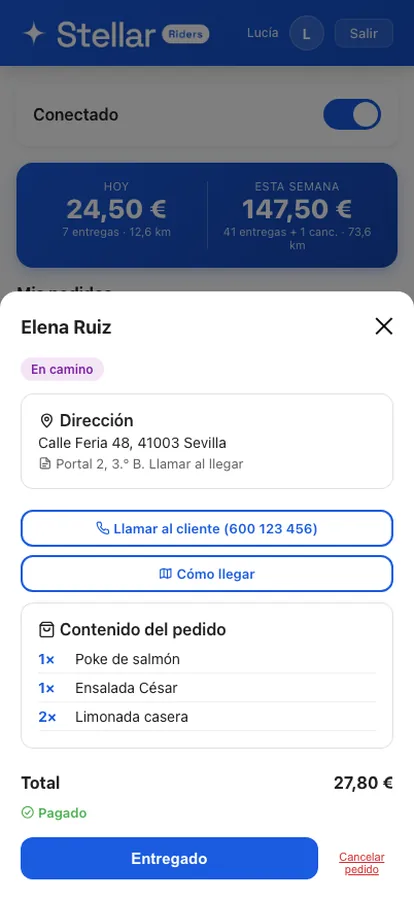
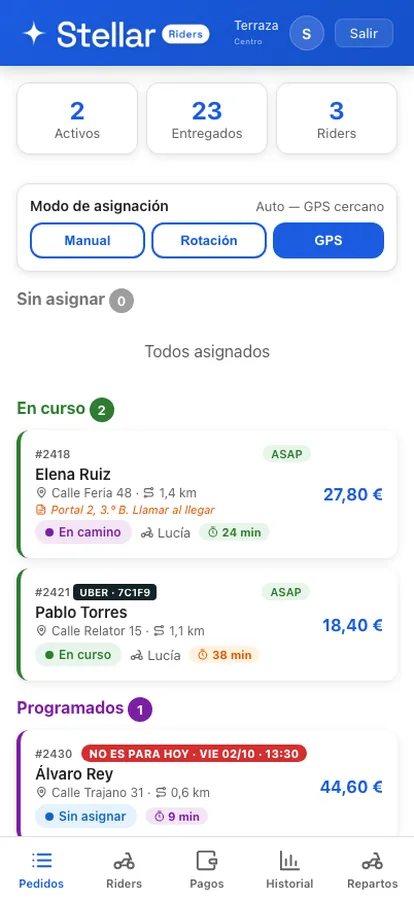
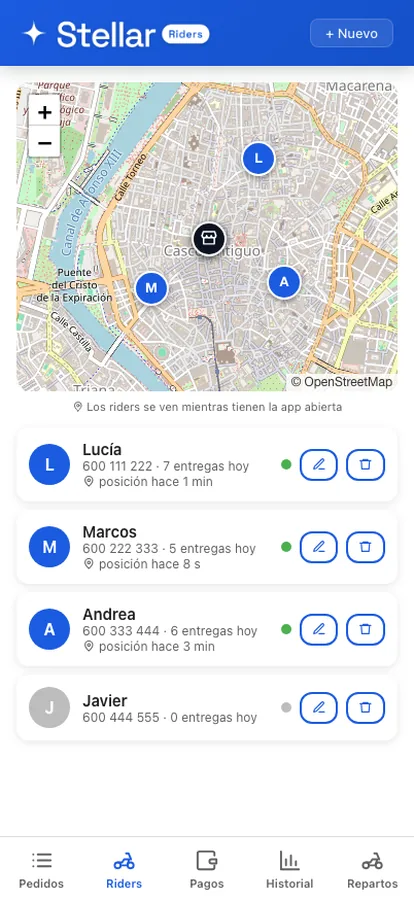
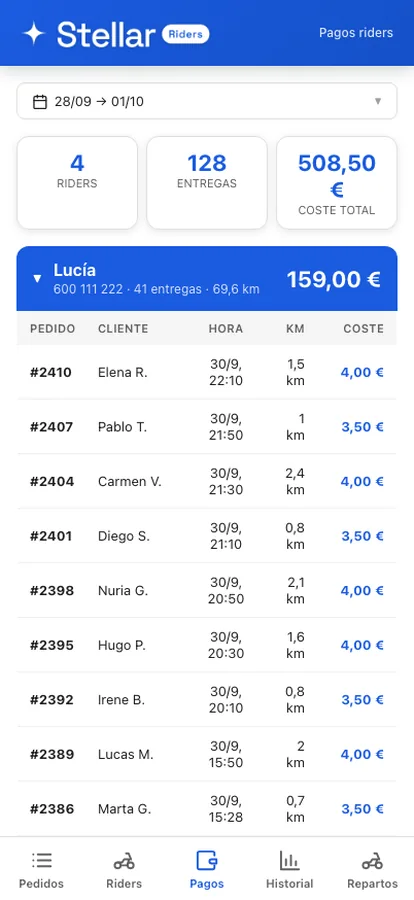
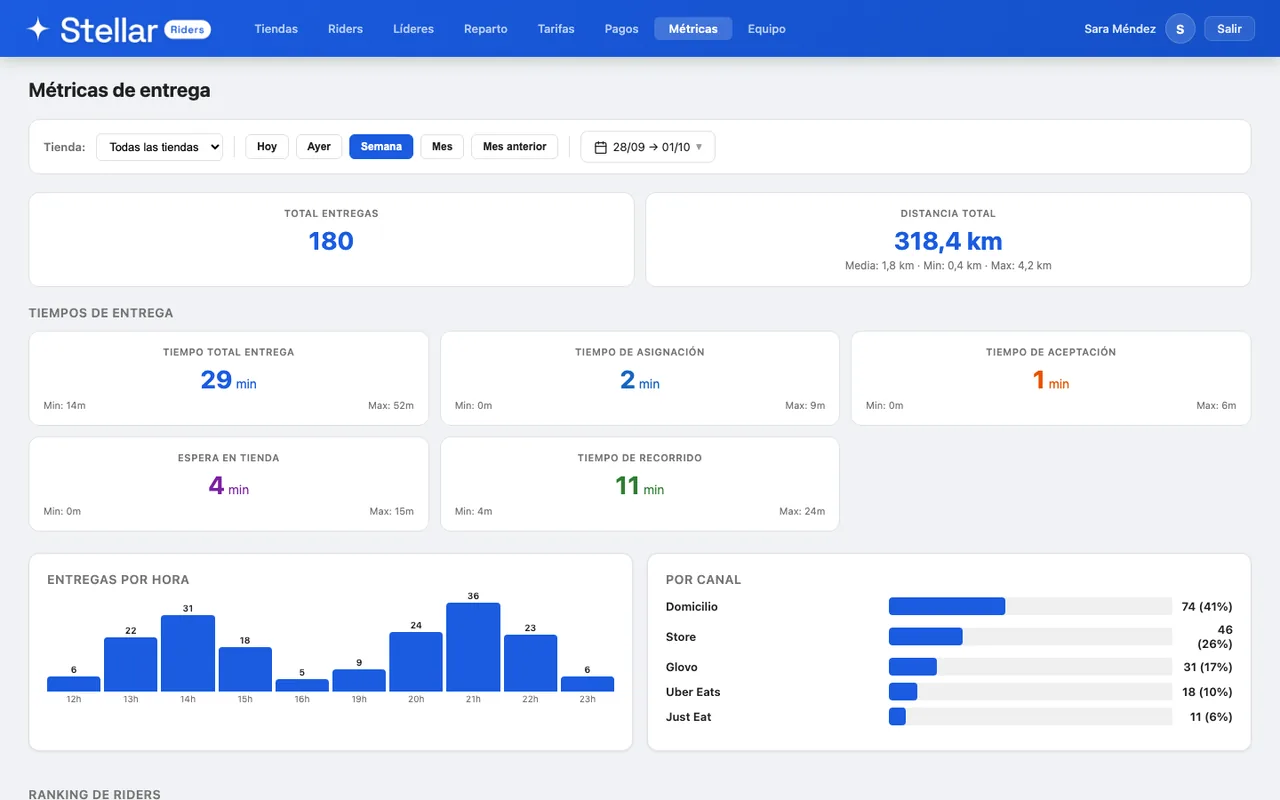
App screenshots with sample data.
Everyone sees exactly what they need
Three profiles, each with its own screen and permissions.
Management dashboard
In the browser: stores, riders, shift leads, when each order goes out for delivery and which channels get delivered, rates, payouts and metrics. You give your team access as owner, manager of their own stores or read-only.
Shift lead
In the same app as the riders: assigns and reassigns orders, picks the assignment mode for their store, watches the map, marks an order as ready if needed, adds the riders for their store and can take deliveries themselves.
Rider
Gets orders with an alert, sees what's in the order and how it's paid, heads to the address, confirms the drop-off and checks what they've earned.
From order to doorstep in 3 steps
No middlemen, no phone calls, no confusion.
The order comes in
A delivery order in Stellar POS, whether from the POS, your Stellar Store or a platform, goes to Riders on its own at the moment you choose: when it comes in, when prep starts or when it's marked ready.
It goes to a rider
The shift lead assigns it to a rider, or it's assigned on its own if automatic mode is on. The rider gets a notification on their phone and accepts it. As soon as the kitchen marks it ready, they can pick it up.
Drop-off and record
The rider hands it over and confirms. The POS is told when it leaves and when it's delivered, and the distance, the times and what the rider earns are all saved.
Plugged into how you already work
Stellar Riders takes the orders from Stellar POS and tells it when they leave, are delivered or are cancelled. No copying anything by hand.
Stellar POS
Delivery orders from the POS reach Riders on their own, and the POS is told when each order leaves, when it's delivered or if it's cancelled. If the POS doesn't respond at that moment, the update is saved and retried for 24 hours.
Stellar Store
Delivery orders from your online store come in through the POS and follow the same path. If the customer drops a pin on their front door, the rider gets that exact spot.
Platform orders
Glovo, Uber Eats, Just Eat or Flipdish orders that come into your Stellar POS are delivered by your riders too, with the platform's logo and order number in plain view.
Alerts on the phone
Native alerts on iPhone and Android: they arrive even when the phone is locked. The shift lead also gets every new order, and orders for another day carry the date in the alert. No SMS, no WhatsApp.
You pay per order delivered
Every delivery operation is different. Let's talk and find the plan that fits yours.
We'll put together a tailored proposal based on your delivery volume, how many riders you have and how many locations.
- Management dashboard + iPhone and Android app
- Rider map and per-order timer
- Rates by distance band
- Integration with Stellar POS and Stellar Store
- Rider payout calculation
- Unlimited riders
- Support included
Your delivery data, protected
The basics, done properly and with no small print.
Encrypted connection
HTTPS on every connection. PINs and passwords are never stored in plain text, and PIN logins are blocked after several failed attempts.
Each company, its own data
Each company's data is kept separate, and each manager only sees the stores you assign them.
Servers in the EU (GDPR)
Hosted in the European Union, with daily backups.
Quick answers
When a delivery order comes into Stellar POS, whether from the POS, your Stellar Store or a platform, it goes to Stellar Riders on its own. In the dashboard you choose the moment (when it comes in, when prep starts or when it's marked ready), whether you want a few minutes' delay and which channels get delivered. The POS is told, without anyone touching a thing, when the order leaves, when it's delivered and if it's cancelled; if it doesn't respond at that moment, the update is saved and retried for 24 hours.
Yes, the Stellar Riders app, free on the App Store (iPhone) and on Google Play (Android). Riders log in with their phone number and a 4-digit PIN, and orders reach them with an alert even when the phone is locked. If they open the website in their phone's browser, they're asked to use the app. The management dashboard runs in the browser.
You set distance bands and what the rider earns in each one. Distance is worked out by road from your store to the customer's address; if an order arrives without a location, the first band applies. Only the account owner can see and change the rates.
Yes. The shift lead sees each online rider's last position on a map and how recent it is. The app sends the position while it's open, and the rider can't go “Online” without allowing location access.
Yes. Each store picks the mode from the shift lead's screen: manual, automatic to the rider closest to the store, or automatic to the rider with the fewest orders in hand. In automatic mode, if a rider declines it or doesn't accept it in time, it goes to someone else; if nobody is online, the order stays in view of the shift lead, who can reassign it at any time.
They're shown separately, under “Scheduled”, and in automatic mode they aren't assigned until half an hour before their time. If they're for another day, the rider's app, the shift lead's app and the phone notification show the date in red: “Not for today”.
Yes. The dashboard works out what each rider is owed per week, broken down by day and based on your rates. If an order is cancelled because of the customer once the rider is already on the way, it still counts. Each rider sees in their app what they've earned today and this week.
The rider sees on the order that they have to collect payment, and how much. They can't mark it “Picked up” until the order shows as paid on the POS, so the amount is in the till before the order leaves the store.
The rider or the shift lead picks the reason from a fixed list and confirms it in a second step, so nobody cancels with a single tap. The cancellation is sent to the POS automatically, and the rider can cancel even without signal.
Yes. If the rider loses signal, they can still see their orders, and whatever they tap (accept, pick up, deliver or cancel) is saved on the phone and sent on its own once signal is back.
Today orders reach Riders from Stellar POS: the ones taken on the POS, the ones from your Stellar Store online store and the platform orders that come into the POS. Orders can't be created by hand in the dashboard. If you use another POS, tell us about your setup and we'll look into it.