Lettus Málaga · Stellar runs every day across our chain of 8 restaurants, with over 1,000 customer reviews.
Everything you need in a POS
Every feature solves a real, day-to-day problem in your business. No filler.
Fast touchscreen
Product groups with colour illustrations, big buttons and the order always in view. Payment in cash, by card or split, with the change worked out for you.
Build-your-own meal deals
“Build your salad”, poke or bowl: base, protein, toppings and sauce, with minimums, maximums and paid extras. The price is recalculated by the server, not the tablet.
Glovo, Uber Eats and Just Eat
With Sinqro, platform orders flow straight into the POS and the kitchen, are accepted automatically and the status goes back to the platform.
Your website and your riders
Orders from your Stellar Store online store come in like any other. Delivery orders pass to Stellar Riders and the POS knows when they leave and when they're delivered.
Kitchen display
Kitchen tickets by status, with how long they've been waiting, the channel and the platform. A sound alert, and orders scheduled for another day are clearly flagged.
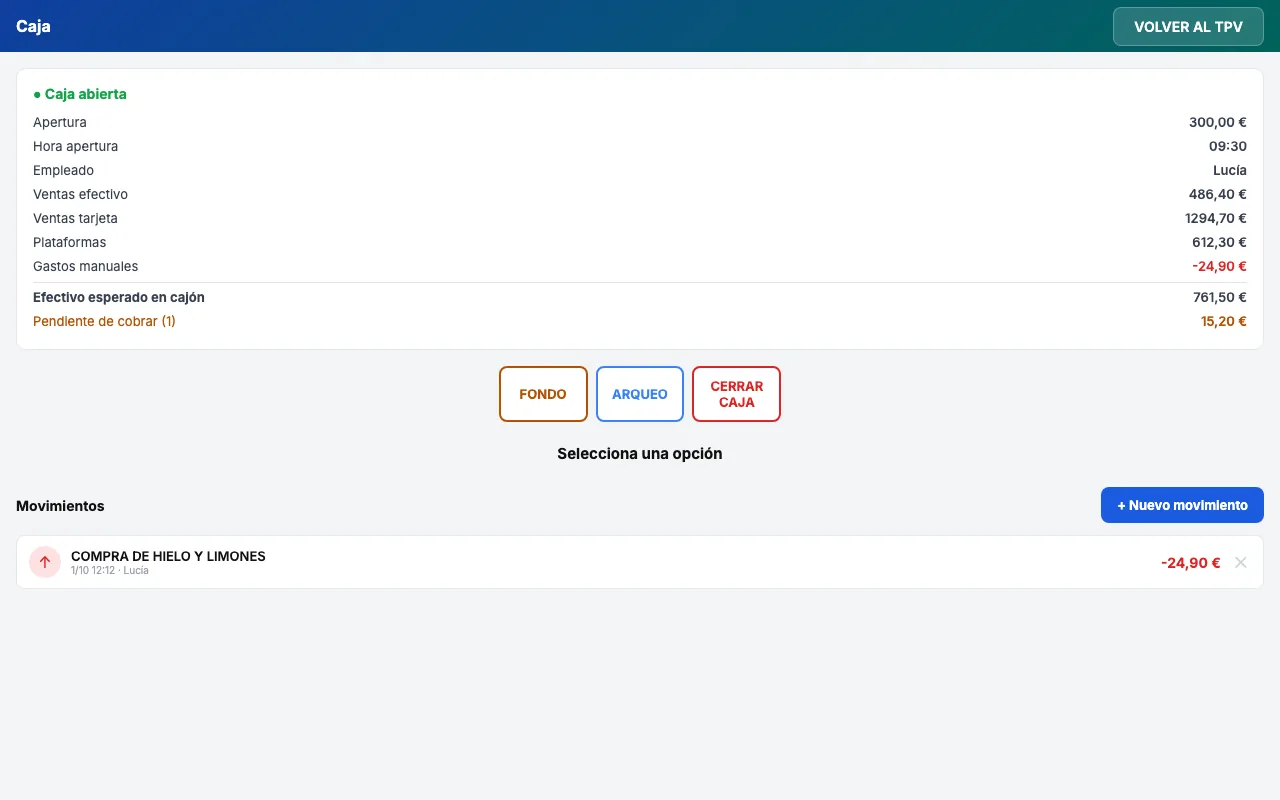
Till and Z report
Opening, cash counts, money in and out, and the Z report as PDF, with cash, card, platforms and split payments shown separately.
Invoices and refunds
Invoices with tax ID by email or printed, a series per location and credit notes. If you switch on the cancellation PIN, it's required to cancel or refund an order.
Promotions
2-for-1 or second item at half price, by product group or product, with dates, days, times and channels. They apply themselves and show up by name on the receipt.
Multi-store and permissions
All your stores in one panel, with roles: owner, manager, location manager and read-only. A read-only portal for each franchisee.
A touchscreen interface built for speed
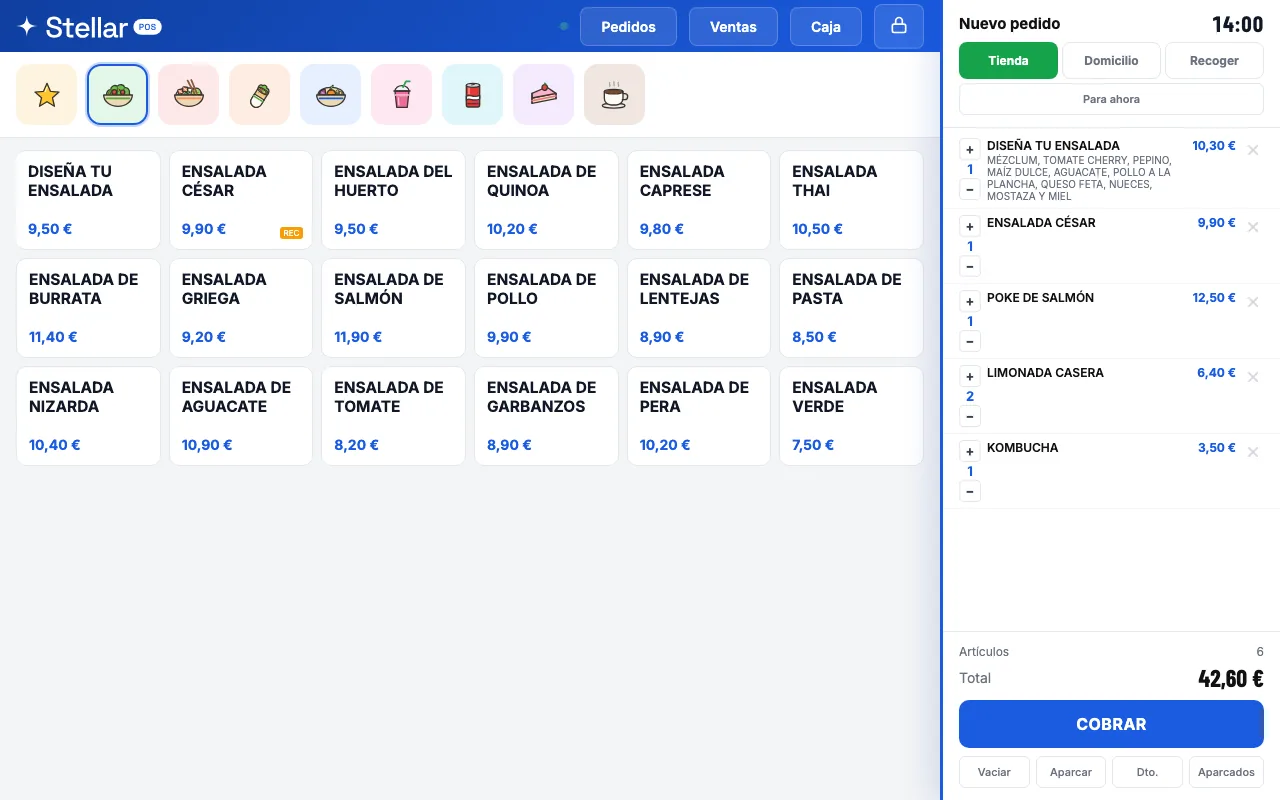
Product groups with colour illustrations, products with their prices and the order always in view. Tap, add up and take payment: dine-in, collection or delivery, with the time if it's a scheduled order.
- Cash, card or split payment, with the change worked out
- Notes per line, discounts capped at the limit you set per location, and parked orders
- Different dine-in and delivery prices for the same product
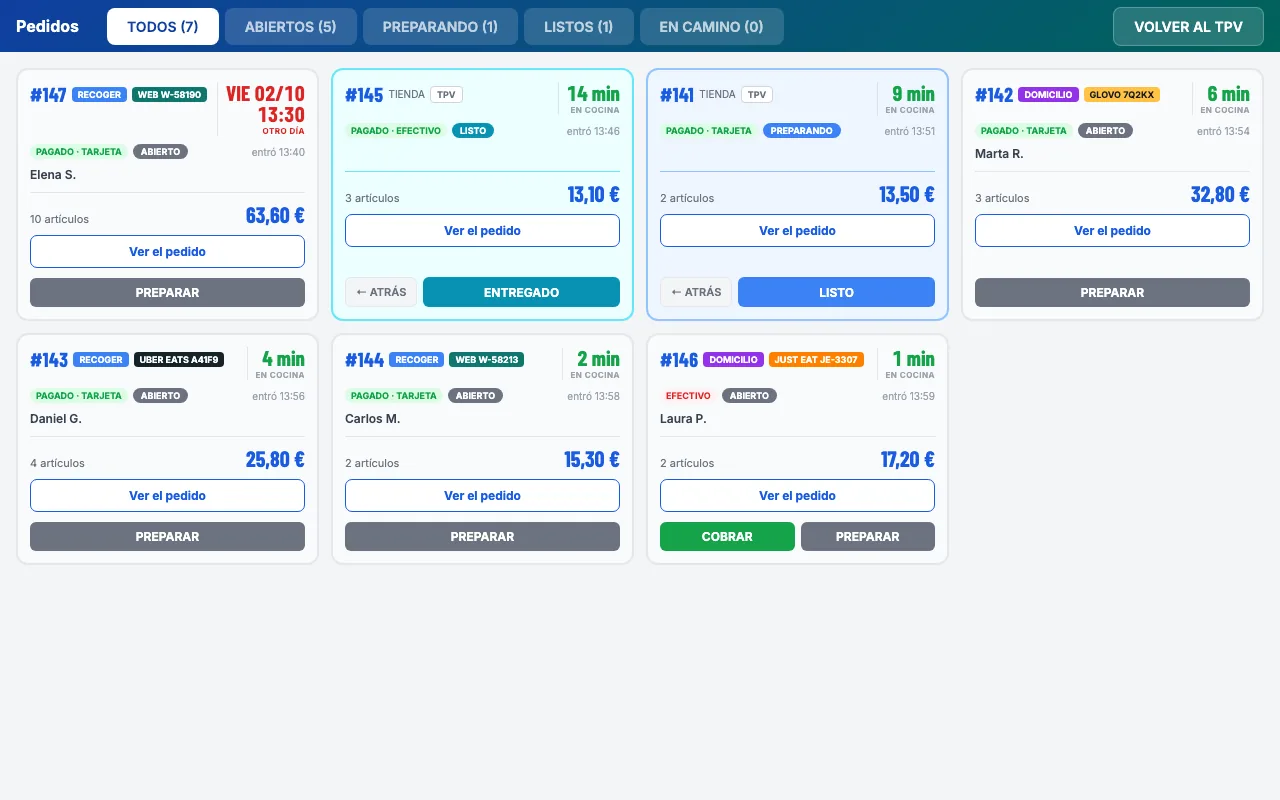
Glovo, Uber Eats, Just Eat and your website, in the same list
Counter, collection, delivery, platforms and online store on a single order screen, each with its platform number, whether it's paid and where it's at.
- With Sinqro, platform orders come in on their own and are accepted automatically
- Stellar Store orders come in just like counter orders
- Orders scheduled for another day are marked with their date, on screen and on the ticket
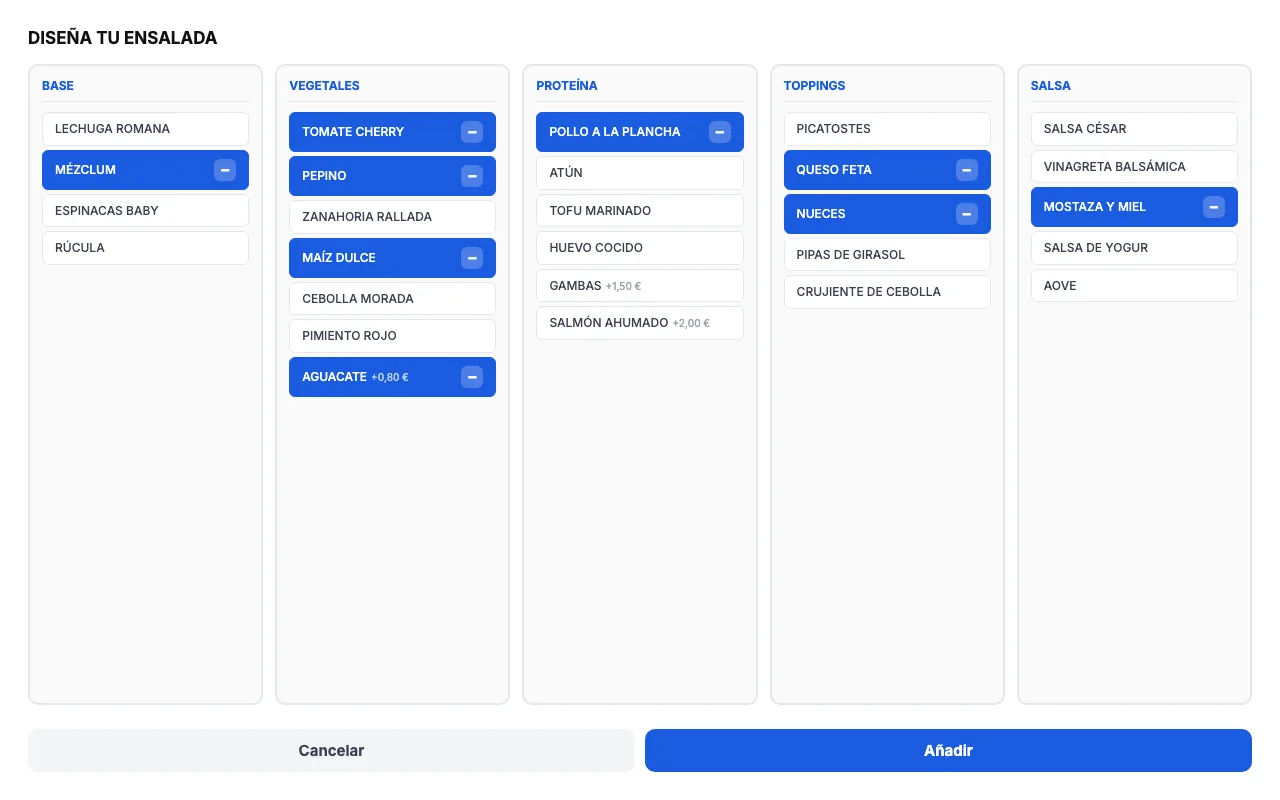
“Build your own…”: made-to-order dishes, with no pricing mistakes
Groups for base, protein, toppings and sauce, with minimums and maximums. Paid extras add themselves up and the kitchen gets every ingredient in the right order.
- Included ingredients and paid extras in the same meal deal
- The server recalculates the price of every line when the order is saved
- Meal deals are published on the platforms' menus too
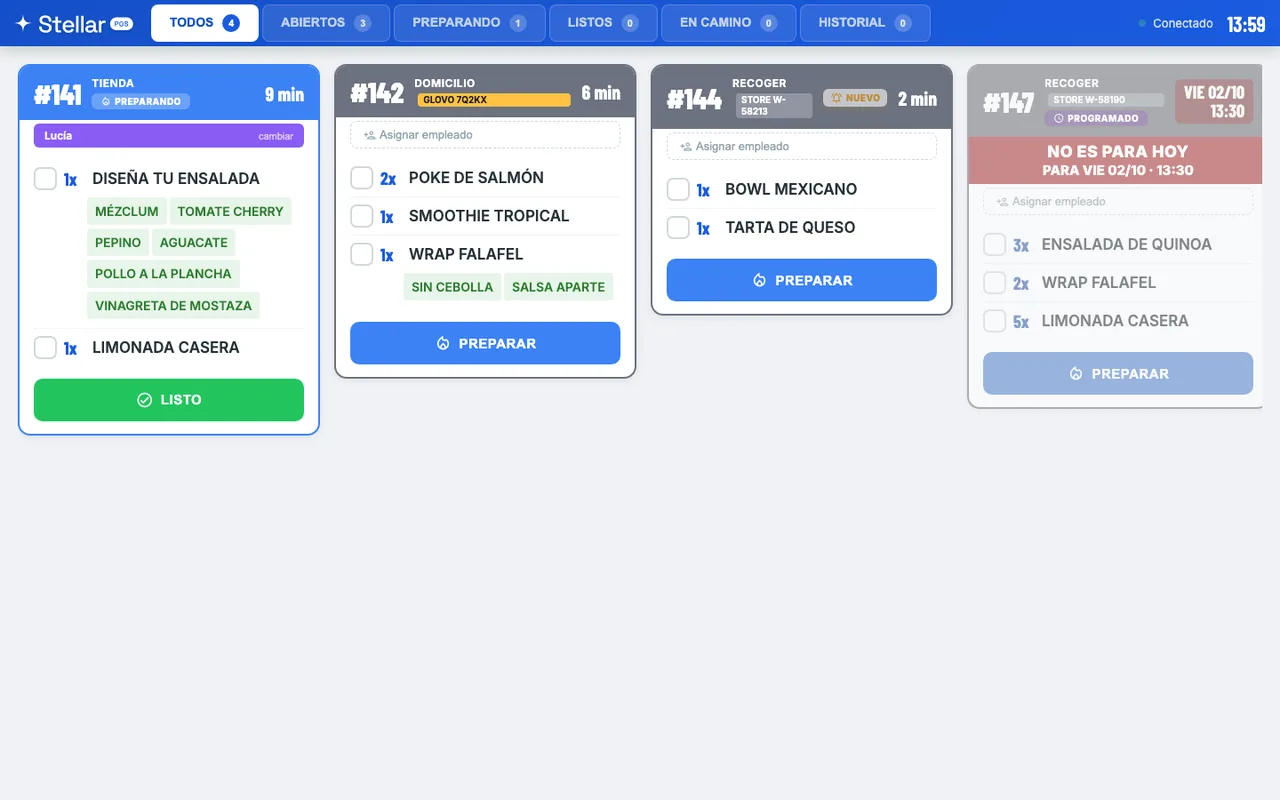
Your kitchen sees every order the moment it comes in
Every order is a card with its status, how long it's been waiting, the channel and the platform. The cook moves it to preparing, ready and delivered with one tap.
- Sound alert when an order comes in, and real-time updates
- Meal deal ingredients and notes in plain view
- Scheduled orders are dimmed until their time; if they're for another day, “Not for today”
The till balances, and if it doesn't, you know why
On the tablet you can always see the float, what's been sold in cash, by card and through the platforms, and the cash that should be in the drawer. When you close, the Z report comes out as a PDF.
- Mid-shift cash counts, and money in and out with its reason
- Card-terminal payments kept separate from what the platform has already collected
- In the panel: cancellations, discrepancies by day and orders that were never paid
Your whole chain from one place
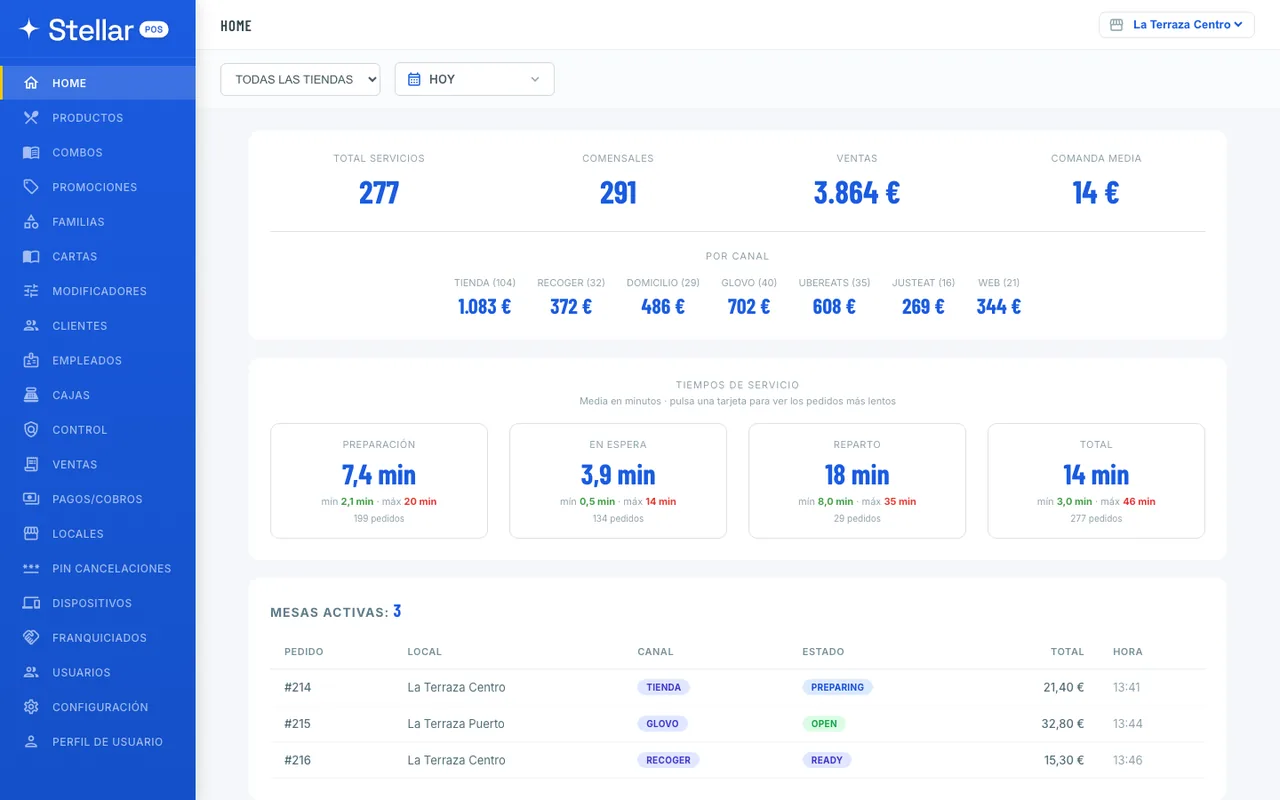
Sales, orders served, average order value and sales by channel, with preparation and delivery times. By location or for the whole chain, by day or by period.
- Menu, product groups, meal deals, modifiers and promotions
- Invoices, credit notes and a monthly Excel file for your accountant
- Users with role-based permissions and a portal for franchisees
Up and running in 3 steps
No proprietary hardware and no waiting for an engineer.
Set up your menu
Create your product groups, products, meal deals and modifiers from the panel, with photos, allergens and dine-in and delivery prices.
Open the POS on your screens
In the browser on a computer or tablet, or with the Android app from Google Play, which prints receipts and kitchen tickets on your network printer and opens the cash drawer.
Start taking payments
Open the till and start selling: receipts, kitchen tickets and end-of-day close from day one.
Stellar POS vs. a traditional POS
No proprietary hardware, no lock-in, no hidden fees.
This isn't lab software
Used every day in the restaurants of our own chain.
01Built for service
Big buttons, illustrated product groups and the order always in view. Meal deals, notes and discounts without leaving the sales screen.
02Fair, predictable pricing
€64/location/month + VAT. No commission per sale and no cost per user or per tablet. You know what you pay each month.
03No proprietary hardware
It runs on the computer or tablet you already have. To print, you need an Android tablet with our app and a network thermal printer.
04Proven in real service
We use it every day in our chain's restaurants, with counter service, platforms, web orders and our own delivery. What you see here is already up and running.
Your sales data, protected
Servers in the European Union, an encrypted connection and a daily backup.
One price, everything included
No cost per user, no cost per terminal, no lock-in. Cancel whenever you want.
+ VAT
You save €128/location/year
- POS, kitchen display and panel
- Meal deals, promotions and invoices
- Till, cash counts and Z report
- Unlimited users and tablets
- Android app on Google Play
- Automatic updates
- Support included
- No lock-in: cancel anytime
Sinqro and the platforms are contracted separately. Stellar Store and Stellar Riders are separate products.
Secure payment with Stripe
Frequently asked questions
Quick answers to everything you need to know before you start.
€64/month + VAT or €640/year + VAT per location (2 months free). No commission per sale and no cost per user or per tablet. No lock-in: you cancel by email and it takes effect at the end of the period you've already paid for.
No. The POS runs in the browser on a computer or tablet, and in the Stellar POS app for Android, on Google Play. To print receipts and kitchen tickets on a network thermal printer and open the cash drawer, use the app on an Android tablet. Card payments are still taken on your card terminal.
Yes, through Sinqro, which you sign up for separately. Orders flow straight into the POS and the kitchen display, are accepted automatically, and the status you set on site goes back to the platform. Your menu, with its meal deals and options, is sent to Sinqro from the panel.
If you sell online with Stellar Store, its orders come into the POS and the kitchen like any other. If you deliver with your own riders, delivery orders pass to Stellar Riders and the POS knows when each order leaves, when it's delivered and if it's cancelled. Store and Riders are separate products.
Yes. All your stores in one panel, each with its own menu, tablets and till. Panel users have a role: owner or administrator, manager of all stores, manager of one location, or read-only. And each franchisee can have their own read-only portal.
Yes. Invoices with a tax ID (NIF or CIF) by email or printed, with a series per location, VAT broken down by rate and a credit note whenever there's a refund. From the panel you download an Excel file each month with sales, VAT, invoices and end-of-day closes for your accountant.
Partly. If the internet goes down, counter sales paid in cash or by card are saved on the tablet and sent automatically once the connection is back. Without a connection no receipt is printed, and delivery orders, split payments and invoices have to wait until the network returns.